Every Client Conversation in One Tab
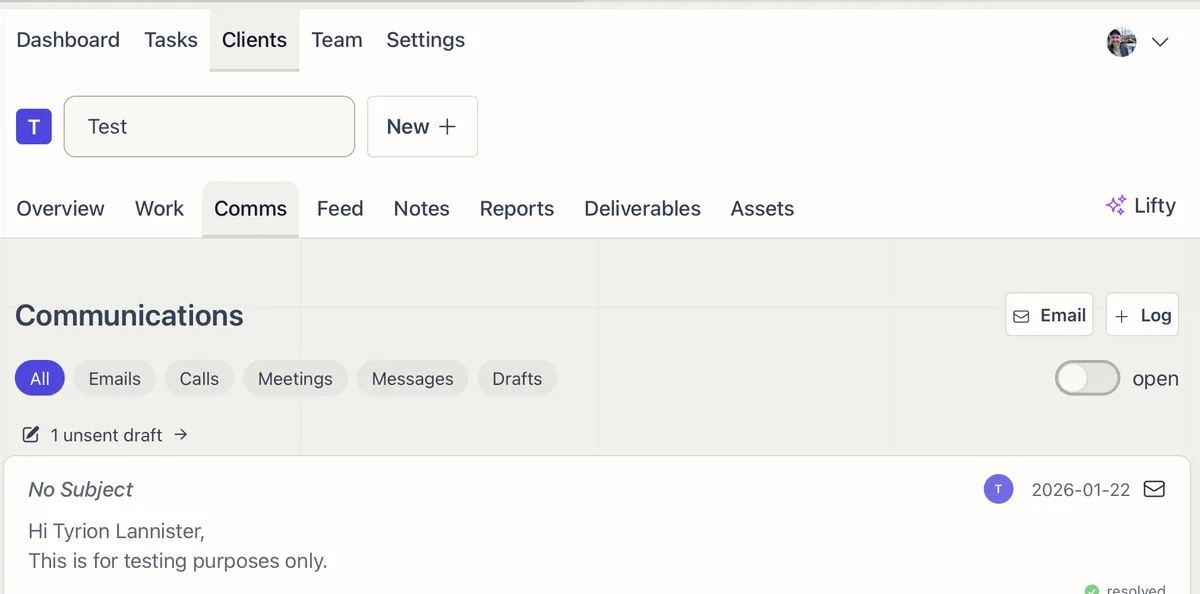
The Comms tab is the full record of how you talk to a client: emails, calls, meetings, and messages, in one place instead of scattered across inboxes and notebooks.
Email: Draft and send to client contacts without leaving the tab. Drafts and sent messages sit side by side.
Gmail sync: Connect Gmail in Settings > Integrations and every email between your team and the client imports automatically, attachments included, kept current with push notifications.
Calls and meetings: Log them by hand, or pipe them in. Sync meeting transcripts from tools like Fireflies and call logs from your phone system through Zapier, each one tied to the right client.
Filter and resolve: Filter by type, emails, calls, meetings, messages, or drafts, and mark each item resolved or unresolved so you can see what still needs a reply.
Communication AI Can Use
Because the whole history lives on the client, Lifty can summarize incoming email, compare it against the work you have already done, and draft a reply that has the context built in. No reconstructing the thread before you can respond.