AI Playbooks Features Pricing Integrations Guides How-Tos

Automate SEO Blog Posts From Your Keyword Strategy

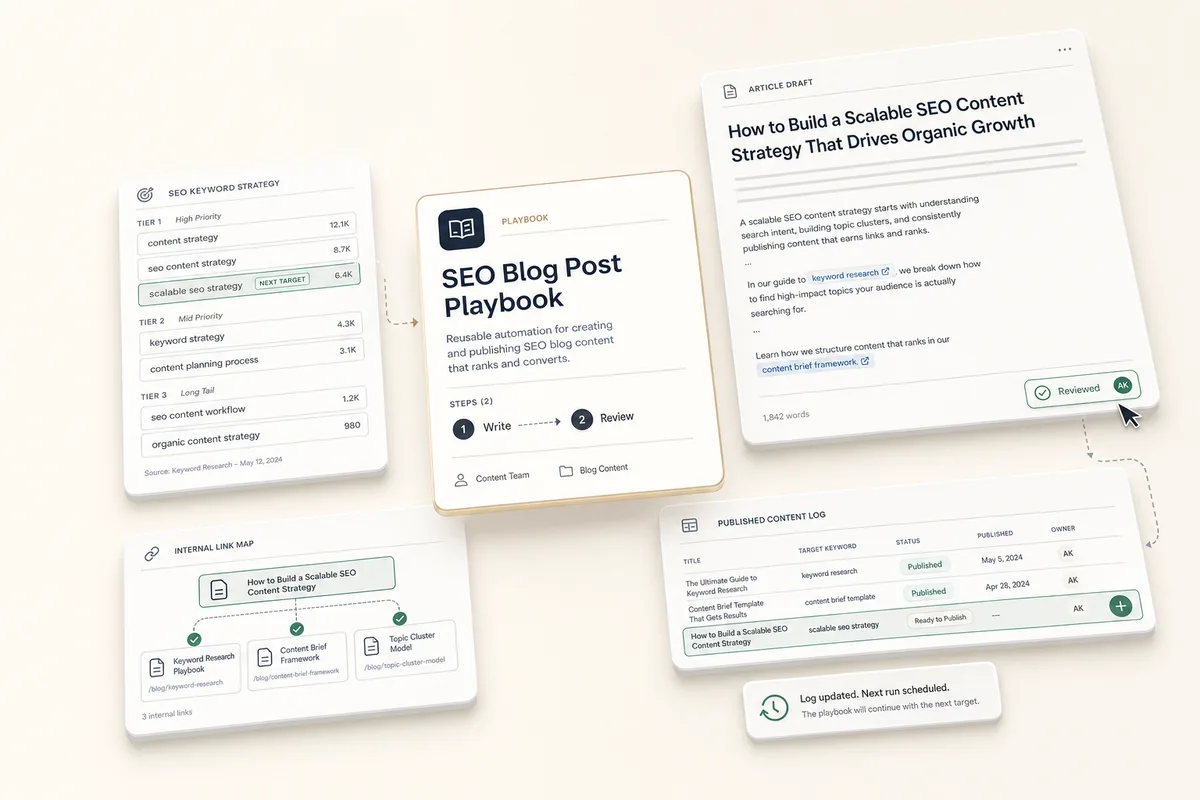
The AI reads the client's keyword strategy note, picks the next keyword to target, checks existing content for cross-links, writes the full article, and updates the strategy so the next post picks up where this one left off.

What this does

This playbook reads the client’s “SEO Keyword Strategy” note (built by the keyword strategy playbook), picks the highest-priority keyword that hasn’t been written about yet, checks the client’s blog for cross-linking opportunities, writes the full article as a deliverable, and updates the strategy note so the next run picks the next keyword automatically. Run it once a week and the keyword list works itself down in priority order.

Best for

Agencies producing blog content for multiple clients on a regular cadence.

How the chain works

Template 1: Write Blog Post from Strategy. Reads the “SEO Keyword Strategy” note to find the next target keyword. Browses the client’s blog for internal linking and to avoid duplication. Optionally pulls Search Console data for the target keyword. Writes the full article as a deliverable. Updates the strategy note’s Published Content Log. When done, books Template 2.

Template 2: Review & Publish. Review the article against the keyword strategy, check internal links, edit for voice, and prepare the post for your CMS.

Requirements

  • Run the keyword strategy playbook first. This playbook looks for a client note titled “SEO Keyword Strategy.” If it doesn’t exist, the AI won’t know what to target.
  • The client profile should have their website URL set so the AI can check existing blog content.
  • Search Console is optional. If connected, the AI uses it for keyword data. If not, it works from the strategy note alone.

How to use it

  1. Make sure the client has an “SEO Keyword Strategy” note.
  2. Create a task from “Write Blog Post from Strategy” for your client.
  3. It reads the strategy note, picks the next keyword, writes the article, and updates the note. To run it immediately, click Run Prompt or mark it complete.
  4. The review task lands in your queue. Check the article, edit for voice, and publish to your CMS.
  5. Run it again next week for the next keyword. The AI reads the updated note and picks the next one in the list.

Tips

  • Batch monthly content. Create 4 tasks at the start of the month, each due a week apart. Each one reads the strategy note, sees what the previous ones wrote, and picks the next keyword. Four articles a month, working through the list in priority order.
  • You control the keyword order. If you want a specific keyword written next, move it to the top of Tier 1 in the strategy note before running this playbook.
  • Cross-linking is automatic. The AI browses the client’s blog before writing, so it knows what pages exist and links to them naturally.
  • Re-run the keyword strategy periodically. After publishing several posts, run the keyword strategy playbook again to refresh recommendations based on new ranking data.
  • Turn posts into social content. After publishing, run the blog to social repurposing playbook to create social posts and a branded image from the article.
  • Other client notes help. If the client has a “Brand Voice” or “Content Guidelines” note, the AI reads all client notes and picks up tone and style when writing.

The templates

Paste these into Settings → Task Templates in your Lifted Work account. Create a template group, add each template in order. When you create tasks from these templates, the AI picks up client context automatically.

Sign in to add
1.

Write Blog Post from Strategy (1/2)

20 min budgeted Auto-complete: on Run AI on complete: on Tags: seo, content, blog
Lifty Prompt

Write a blog post for this client based on their SEO keyword strategy.

Step 1: Read the keyword strategy Look up the client’s notes and find the one titled “SEO Keyword Strategy”. Read it carefully. Look at the Published Content Log to see what’s already been written, then find the highest-priority keyword in Tier 1 that hasn’t been covered yet. If all Tier 1 keywords have posts, move to Tier 2.

If no “SEO Keyword Strategy” note exists, stop and report that the keyword strategy playbook needs to be run first.

Step 2: Research for the article Browse the client’s blog/website to:

  • See what pages already exist (for internal cross-linking)
  • Understand the client’s voice and writing style
  • Confirm the target keyword isn’t already covered by an existing post

Try to pull Search Console data for the target keyword and related queries. If Search Console is not connected, that’s fine — skip this step and work from the strategy note and website analysis.

Step 3: Write the article Create one deliverable with the complete article. Include:

  • A suggested slug in the deliverable title (e.g., “how-to-choose-a-dentist-in-chicago”)
  • A meta title (under 60 characters, includes the target keyword)
  • A meta description (under 155 characters)
  • The full article with:
    • Target keyword used naturally in the title, first paragraph, and 2-3 H2 headings
    • Short paragraphs, actionable takeaways, clear structure
    • Internal links to existing pages on the client’s site where relevant
    • A clear CTA at the end
    • 1000-1500 words unless the topic requires more

Save the target keyword and suggested slug in the deliverable’s meta field.

Writing rules: no em dashes, no “leverage,” “elevate,” “unlock,” “seamlessly,” or “in today’s digital landscape.” Write like a helpful expert, not a marketer.

Step 4: Update the strategy note Update the client’s “SEO Keyword Strategy” note. Add the new post to the Published Content Log section in this format: - [suggested-slug] — "Target Keyword" (today's date)

Preserve all existing content in the note — only append to the Published Content Log.

When done, create a task from the “Review & Publish Blog Post (2/2)” template assigned to me, due tomorrow.

2.

Review & Publish Blog Post (2/2)

20 min budgeted Tags: seo, review, publishing
SOP / Details

AI has written a blog post based on the client’s SEO keyword strategy. Review before publishing:

  1. Check the keyword choice. Open the client’s “SEO Keyword Strategy” note and verify the AI picked an appropriate keyword. If you’d rather target a different one, you can reorder the note and re-run.
  2. Read the article. Open the deliverable on the previous task. Check that it’s well-written, accurate, and sounds like this client.
  3. Verify internal links. Make sure any cross-links point to real pages on the client’s site.
  4. Check the meta title and description. Make sure the target keyword is included and they’re the right length.
  5. Edit for voice and accuracy. The AI writes clean copy but can’t verify facts or match the client’s exact tone.
  6. Publish to your CMS. Copy the content, set the slug (suggested in the deliverable title), add a featured image, and publish.
  7. Confirm the strategy note was updated. Check that the Published Content Log in the “SEO Keyword Strategy” note has the new post listed.
  8. Mark this task complete.

Make your future better

Adopt at your own pace
Guided setup
Cancel anytime
Easy start