AI Playbooks Features Pricing Integrations Guides How-Tos

Generate Ad Creatives From Proven Frameworks

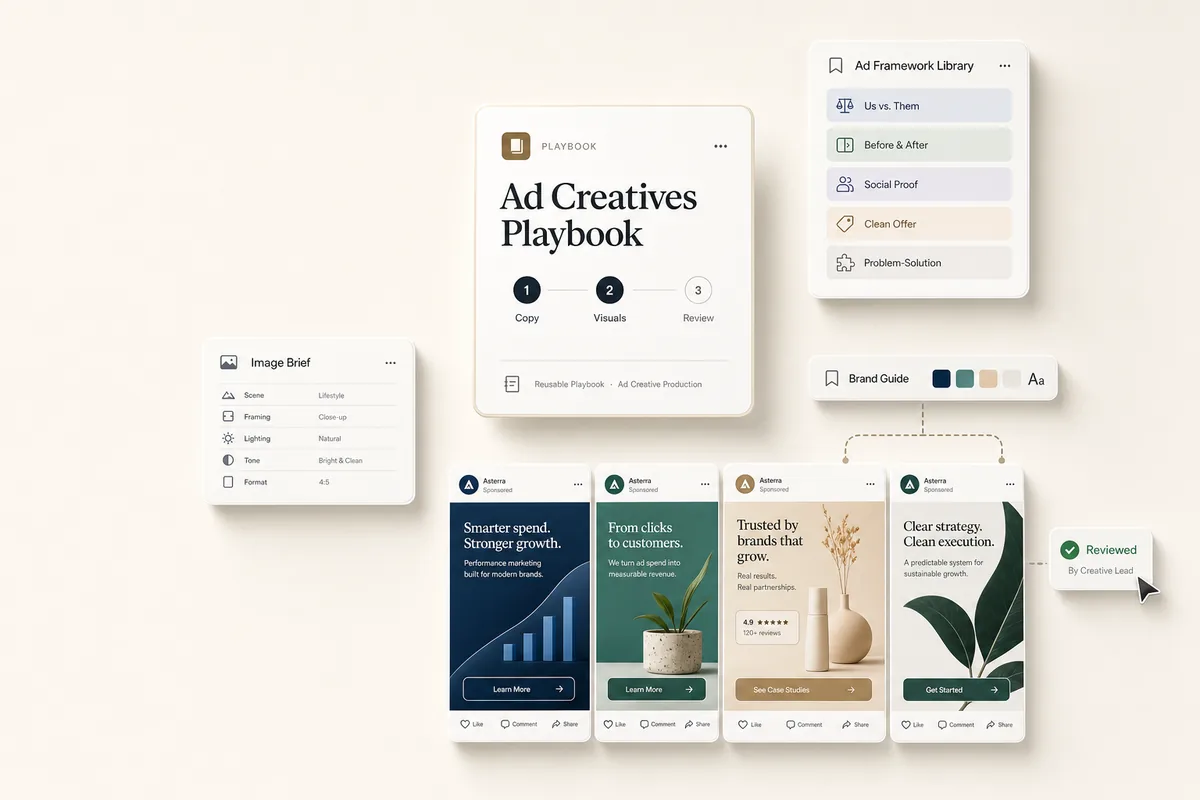
Three chained tasks: write ad copy from 10 proven frameworks, generate matching visuals, and land a review task on your desk with 4 complete creatives.

What this does

Three tasks, four finished ad creatives. The first task reads the client’s Brand Guide and website, picks 4 ad frameworks from a library of proven scaffolds, and writes the copy as deliverables. The second task reads the Brand Guide’s Image Generation Prompt Modifier and reference images, fills the matching template scaffold for each ad, and generates visuals that look like they came from the same art director. The third lands on your desk to review all 4 complete creatives before they go anywhere.

Prerequisite

Run the Brand Guide playbook for this client first. This playbook reads the “Brand Guide” client note it produces to apply the client’s photography direction, visual system, and Image Generation Prompt Modifier to every creative. Without the Brand Guide note, Template 2 stops and flags the missing prerequisite rather than generating generic images.

Best for

Agencies running paid social or organic content who need a batch of on-brand creatives without starting from scratch every time.

How the chain works

Template 1: Ad Creative Copy. Reads the client profile, the Brand Guide note, and browses the client’s website. Picks 4 frameworks from 10 proven ad angles (see below), each mapped 1:1 to a visual scaffold in the template library. Creates one deliverable per ad with copy, CTA, and hashtags, plus a template_id and image brief in meta. When done, books Template 2.

Template 2: Generate Ad Visuals. Reads the Brand Guide note for the Prompt Modifier and reference image URLs. For each deliverable from Template 1, looks up the template scaffold, fills its bracketed placeholders with the copy, hex colors, fonts, and product details, prepends the Prompt Modifier, picks the best reference image URL as a visual style reference, and generates the image. Updates the deliverable to embed the image. If no Brand Guide note exists, it stops and creates a “Blocked: Brand Guide missing” deliverable instead. When done, books Template 3.

Template 3: Review Ad Creatives. You check each deliverable’s copy and image against the Brand Guide reference images, edit what needs adjusting, and schedule through your posting tool.

The 10 ad frameworks

The AI picks the 4 that best fit the client. Each framework is a proven advertising angle:

Framework Best for
Us vs. Them Differentiation in competitive markets
Myth vs. Truth Education, authority, thought leadership
Social Proof / Results Trust-building, bottom-of-funnel
Before & After Visual services, transformation stories
Scroll-Stopping Hook Awareness, top-of-funnel reach
Clean Offer Promotions, launches, limited-time offers
Problem-Agitate-Solution Service businesses, pain-point marketing
Did You Know Education, shareable content
Quote / Authority Personal branding, credibility
Behind the Scenes Authenticity, humanizing the brand

Requirements

  • Templates 1-2 need Autocomplete and Run on complete enabled.
  • The Brand Guide playbook has been run for this client and a “Brand Guide” client note exists.
  • The client profile should have brand colors and a description filled in.
  • The client’s website URL should be set so the AI can browse it for voice and positioning.

How to use it

  1. Create a task from “Ad Creative Copy (1/3)” for your client
  2. On its due date, it autocompletes and the chain runs through both AI steps. To run it earlier, mark it complete yourself, set the due date sooner, or open the task and click Run Prompt.
  3. The review task lands in your queue. Check the copy and images, edit what needs adjusting, then schedule through your posting tool.

Tips

  • Tighten the Brand Guide first. Output quality here is capped by the quality of the Image Generation Prompt Modifier in the Brand Guide note. If creatives come back generic, rewrite the modifier and rerun.
  • Fill in the client description. Industry, target audience, and brand voice all improve the output.
  • Narrow the framework list. If you know which frameworks work for a specific client, edit the prompt to remove the others.
  • Already running ads? Add meta_ads_report to Template 1’s tools and a line to the prompt: “Check the client’s current Meta ads to see what’s already running. Avoid duplicating active angles.”
  • Pairs with the Brand Guide playbook (builds the note this playbook reads from) and the Blog to Social playbook (turns published articles into social posts using the same Brand Guide).

Credits

The 10 ad template scaffolds are adapted from a public prompt walkthrough shared by Will Sartorius and the Adcrate team: Nano Banana 2 Prompt Document and their YouTube walkthrough. We have rewritten the scaffolds in our own voice and trimmed the set to ten, but the underlying angles and composition structures are theirs.

The templates

Paste these into Settings → Task Templates in your Lifted Work account. Create a template group, add each template in order. When you create tasks from these templates, the AI picks up client context automatically.

Sign in to add
1.

Ad Creative Copy (1/3)

20 min budgeted Auto-complete: on Run AI on complete: on Tags: social, ads, creative
Lifty Prompt

Read the client profile for brand colors, fonts, logo URL, and description.

Look up client notes filtered by title “Brand Guide” and read its full content. This note is the source of truth for voice, visual system, photography direction, product details, and ad creative style. If no Brand Guide note exists, continue but flag it in each deliverable — the visuals step will stop if it is missing.

Browse the client’s website to sanity-check the Brand Guide against current messaging and pick up any recent product or offer language.

Pick 4 different frameworks from this list. Each framework maps 1:1 to a template_id that Template 2 uses to select the visual scaffold:

  1. Us vs. Them (template_id: 7) — side-by-side comparison of the old way vs. the client’s way
  2. Myth vs. Truth (template_id: 4) — debunk a common industry misconception using an educational diagram layout
  3. Social Proof / Results (template_id: 6) — lead with a measurable outcome, include stars and a review card
  4. Before & After (template_id: 8) — UGC-native mirror-selfie transformation, must feel like a real person’s post
  5. Scroll-Stopping Hook (template_id: 16) — provocative setup line plus bait phrase, reveal reframes it
  6. Clean Offer (template_id: 2) — straightforward promotional ad with split background and clear offer
  7. Problem-Agitate-Solution (template_id: 3) — testimonial-style with real environment and quote overlay
  8. Did You Know (template_id: 1) — surprising fact or stat rendered as a headline ad
  9. Quote / Authority (template_id: 11) — pull-quote review card with truncated review and Read more tease
  10. Behind the Scenes (template_id: 21) — bold statement on a gradient, copy is the whole ad

Create one deliverable per ad, titled “[Framework Name] - [Platform]”. Distribute across at least 3 platforms (Instagram, Facebook, LinkedIn, Twitter/X).

Each deliverable’s content should include: headline, platform-ready ad copy, one clear CTA, and relevant hashtags.

In each deliverable’s meta field, include:

  • template_id: the integer from the mapping above
  • framework: the framework name
  • aspect_ratio: one of “1:1” (Instagram feed, universal), “4:5” (Instagram portrait, Facebook feed), “9:16” (Stories, Reels, TikTok), “16:9” (LinkedIn, Twitter, YouTube). Pick the one that matches the target platform.
  • copy_for_image: the exact text that should appear rendered in the image (headline, quote, offer, stat — whichever applies to the framework). Keep under 10 words per line. If the framework has a headline and a subhead, provide both.
  • attribution: for testimonial or quote frameworks, the reviewer name, credential, and any flag emoji (e.g., “Dawn K., 🇺🇸 , Verified Reviewer”). Leave blank for frameworks that do not need it.
  • notes: anything specific Template 2 should know (e.g., “product shown is the 12oz can”, “show the subscription box open”, “emphasize the 900k customers number”).

Do not write the image generation prompt yourself — Template 2 assembles it from the Brand Guide modifier, the template scaffold, and the meta fields above.

Writing rules:

  • No em dashes
  • No “game-changer,” “leverage,” “elevate,” “unlock,” “seamlessly,” or “in today’s digital landscape”
  • Write like a direct-response copywriter. Short sentences. Strongest line first.
  • Use the client’s actual services and audience, not generic marketing language. Pull voice adjectives from the Brand Guide.

When done, create a task from the “Generate Ad Visuals (2/3)” template assigned to me, due in 5 minutes.

2.

Generate Ad Visuals (2/3)

20 min budgeted Auto-complete: on Run AI on complete: on Tags: social, ads, visuals
Lifty Prompt

Generate one on-brand visual for each ad deliverable from Template 1.

Step A — Load the Brand Guide. Call list_client_notes filtered by title “Brand Guide” for this client.

If no Brand Guide note is found, STOP. Create one deliverable titled “Blocked: Brand Guide missing” with content explaining that the Brand Guide playbook (/automations/automate-brand-guide) must be run for this client before ad visuals can be generated. Do not call generate_image. Still book Template 3 so the human sees the block.

If the Brand Guide note exists, extract and hold on to:

  • The Image Generation Prompt Modifier paragraph (required — prepended to every image prompt below)
  • The Visual System section (primary, secondary, accent hex values; heading and body fonts)
  • The Ad Creative Style section
  • The Image Dos and Don’ts section — if present, append its rules to every prompt you build below after the scaffold
  • The Reference Images catalog — parse every entry across every sub-heading (From the homepage, From the About page, etc.). Each entry has a URL, an alt text, and a one-sentence description of what it shows. Hold this whole catalog in working memory; you will pick one URL per ad based on which description best matches the ad’s needs.

Step B — Read the ad deliverables. Call list_task_deliverables for this client with include_content true. For each deliverable with a template_id in meta, you will generate one image.

Step C — For each deliverable, build the prompt.

  1. Pull from meta: template_id, framework, aspect_ratio, copy_for_image, attribution, notes.

  2. Pick the matching scaffold from the Template Library below using template_id.

  3. Replace every [BRACKETED] placeholder in the scaffold with real values:

    • [BRAND] → client name
    • [PRIMARY BRAND COLOR], [BRAND COLOR], [ACCENT COLOR], [CONTRAST COLOR] → hex values from Visual System, written as e.g. “#2563EB”
    • [YOUR PRODUCT] → product name and one-line physical description from the Brand Guide Product Details
    • [HEADLINE], [YOUR OFFER], [PULL-QUOTE], [BAIT PHRASE], [REVEAL], [STAT N] etc. → from copy_for_image in meta
    • [REVIEWER NAME], [ATTRIBUTION] → from attribution in meta
    • [BACKGROUND], [SETTING], [SURFACE], [PROPS] → pull from the Brand Guide Photography Direction section
    • Anything else → use the notes field in meta and the Brand Guide
  4. Pick the best reference image URL for this ad. Scan the Reference Images catalog and evaluate each entry against the ad’s needs using, in this order:

    • The one-line description (“shows: …”)
    • The alt text and URL path, when the description says “subject unclear”
    • The source sub-heading (From the homepage / About page / product page), as a last-resort hint

    Match guidance:

    • Product-dominant templates (1, 2, 4, 6, 11): prefer a description clearly showing the product; fall back to any image from the product / services page
    • Lifestyle or in-use templates (3, 8): prefer a description showing the product in use with a person or environment; fall back to homepage images
    • Abstract, statement, color-block templates (7, 16, 21): prefer a description with strong brand mood or hero composition; fall back to homepage images

    If no entry clearly fits, pick the closest candidate and record “reference image was a weak match” in the deliverable’s meta.notes so the reviewer knows to check the output carefully.

  5. Assemble the final prompt in this exact order: {Image Generation Prompt Modifier}\n\n{Filled template scaffold}

Step D — Generate and attach. Call generate_image with:

  • prompt: the assembled prompt from Step C
  • image_url: the reference image URL chosen in Step C
  • aspect_ratio: the value from the deliverable’s meta (default “1:1” if missing)
  • client_id: this client
  • title: “{framework} ad visual”

Then call update_deliverable on the Template 1 deliverable, prepending the returned image URL to the content as a markdown image so it displays inline: ![{framework} ad visual]({returned_url})

Template Library (10 scaffolds — one per framework, fill the brackets, do not edit the structure). Adapted from the ad-angle playbook Adcrate shared publicly (https://www.youtube.com/watch?v=ibzfKRRSHhU).

template_id: 1 (Headline) — Use a [BACKGROUND] color field. Put a large bold sans-serif [HEADLINE] across the upper third, with [SUBHEAD] underneath in smaller type. Show [YOUR PRODUCT] in the lower half with [DETAILS] nearby on the same surface. Camera: 50mm at f/2.8, slightly above the product. [BRAND] logo bottom right. Keep it clean and authoritative.

template_id: 2 (Offer/Promotion) — Split the composition horizontally: top 60% in [PRIMARY BRAND COLOR], bottom 40% in [CONTRAST COLOR]. Center [YOUR PRODUCT] on the color boundary with soft studio lighting. In the top area, set [YOUR OFFER] in large contrast-color sans-serif, with [OFFER DETAILS] underneath. Bottom area gets small brand-color text listing [VALUE ADDS]. [BRAND] logo bottom right.

template_id: 3 (Testimonial) — Set the scene in [SETTING] with warm natural light. Place [YOUR PRODUCT] on [SURFACE], slightly out of focus. Overlay a bold white sans-serif [SHORT HEADLINE] at larger size, followed by [FULL QUOTE 2-3 sentences] and attribution [NAME], [CREDENTIAL]. Add five filled stars in [BRAND COLOR]. [BRAND] logo bottom right in white. Shoot at 35mm f/2.0.

template_id: 4 (Features/Benefits Point-Out) — Educational diagram on a white background. Bold [BRAND COLOR] [HEADER] across the top. Center [YOUR PRODUCT] with even studio lighting. Draw four callout boxes around the product with thin connecting lines, each containing one of [BENEFIT 1-4] and a small [BRAND COLOR] circle. [WEBSITE] at bottom center. [BRAND] logo bottom right. The feel is a scientific diagram reinterpreted by a luxury agency.

template_id: 6 (Social Proof) — Social proof layout on [BACKGROUND]. Top line: [HEADLINE like ‘Join 1,000,000+ Members’] in bold [BRAND COLOR], with five filled stars and ‘Rated [X] out of 5’ beneath. Center [YOUR PRODUCT] at 50mm f/4. Below the product, a frosted white card containing five stars, [REVIEW TITLE], [2-3 SENTENCE REVIEW], and italic [ATTRIBUTION]. Under the card, an ‘As Featured In’ row with five grayscale publication logos. [BRAND] logo bottom right.

template_id: 7 (Us vs Them) — Divide the frame vertically down the center. Left half: muted gray-blue background with [COMPETITOR CATEGORY] header, a generic competitor product, and a list of [WEAKNESS 1-5] each marked with an X. Right half: [PRIMARY BRAND COLOR] background with [YOUR BRAND] header, [YOUR PRODUCT], and a list of [STRENGTH 1-5] each marked with a checkmark. A white ‘VS’ circle sits over the divider at the top. [BRAND] logo bottom right.

template_id: 8 (Before & After UGC Native) — This has to look like a real phone post, not a polished ad. Split-screen before/after. LEFT: grainy iPhone mirror selfie, [PERSON] in a dimly lit bathroom, [BEFORE STATE], harsh overhead lighting, handwritten white [BEFORE DATE]. RIGHT: same person, same bathroom, now in bright natural light, [AFTER STATE], with [PRODUCT] visible on the counter, handwritten white [AFTER DATE]. Top center: [TIMEFRAME] on [BRAND] plus emoji. Feels like it was stitched together in CapCut.

template_id: 11 (Pull-Quote Review Card) — Full-bleed background in a solid [BRAND COLOR] block. Upper half: a bold italic serif [PULL-QUOTE] (4-8 most emotional words of the review) in white with curly quotation marks. Below it, five large filled gold stars in a row. Bottom-left, overlapping the color block, place a white rounded review card with a soft shadow: gray avatar icon, bold [REVIEWER NAME] with a small [FLAG EMOJI], blue checkmark and ‘Verified Reviewer’ in blue, review body 4-6 lines trailing into ‘…Read more’ in bold [BRAND COLOR], and ‘Was this review helpful?’ with thumbs-up and count. Bottom-right, overlapping both card and background: [YOUR PRODUCT] angled toward the viewer with a soft shadow.

template_id: 16 (Curiosity Gap / Hook Quote) — Clean white background. Top-center: large [ACCENT COLOR] opening quotation marks. Below, a three-part headline: an italic-serif [SETUP LINE], then an oversized heavy-weight bold all-caps sans-serif [BAIT PHRASE] filling two lines, then a smaller sentence-case [REVEAL]. Closing quotation marks and regular-weight [ATTRIBUTION] close it out. Lower-left third: [YOUR PRODUCT] at a slight angle with [PRODUCT DETAILS], a circular [TRUST BADGE] to its left. Lower-right third: five filled [ACCENT COLOR] stars with bold [REVIEW COUNT] 5-Star Reviews.

template_id: 21 (Bold Statement Reaction Headline) — Background is a vibrant [GRADIENT] running diagonally from upper-left to lower-right. Upper-left carries a loose, expressive, oversized [FONT STYLE] white [BOLD STATEMENT] — the copy is the ad. Upper-right: [PERSON DETAIL] reaching down into frame toward [YOUR PRODUCT], which sits center-right below the midline. Bottom-left: [BRAND] logo in [LOGO COLOR] with [PRODUCT DESCRIPTOR] in smaller type. No stats, no review cards. The gradient and the line carry the whole creative.

Global constraints for every image (append to the end of every filled prompt): no watermarks beyond the [BRAND] logo where specified, no extra text beyond what is specified, no clip art, no stock-photo tropes, single focal point, clean composition.

When done, create a task from the “Review Ad Creatives (3/3)” template assigned to me, due tomorrow.

3.

Review Ad Creatives (3/3)

20 min budgeted Tags: social, ads, review
SOP / Details

AI has generated 4 ad creatives for this client. Each deliverable has copy and a generated image that was built from the client’s Brand Guide note. Review before scheduling or sending to the client:

  1. Check for a block. If there is a deliverable titled “Blocked: Brand Guide missing”, run the Brand Guide playbook for this client first, then rerun Template 2 of this playbook.
  2. Open the Brand Guide note on the client’s Activity screen. Keep it open in a second tab so you can compare the ad images against the four reference images.
  3. Open the deliverables. Each one is named “[Framework] - [Platform]”.
  4. Check the copy. Does it sound like this client’s voice (compare against the Brand Guide voice adjectives)? Is the CTA clear? Are hashtags relevant?
  5. Check the images against the reference images. Do the colors match? Does the photography direction match? If an image feels off-brand, open the Brand Guide note, tighten the Image Generation Prompt Modifier paragraph, then rerun this task’s Template 2 or ask Lifty in the client’s chat to regenerate that single image.
  6. Edit any deliverables that need adjustments before scheduling.
  7. Approve the ones that are ready and schedule them through your posting tool.
  8. Mark this task complete.

Make your future better

Adopt at your own pace
Guided setup
Cancel anytime
Easy start