What this does
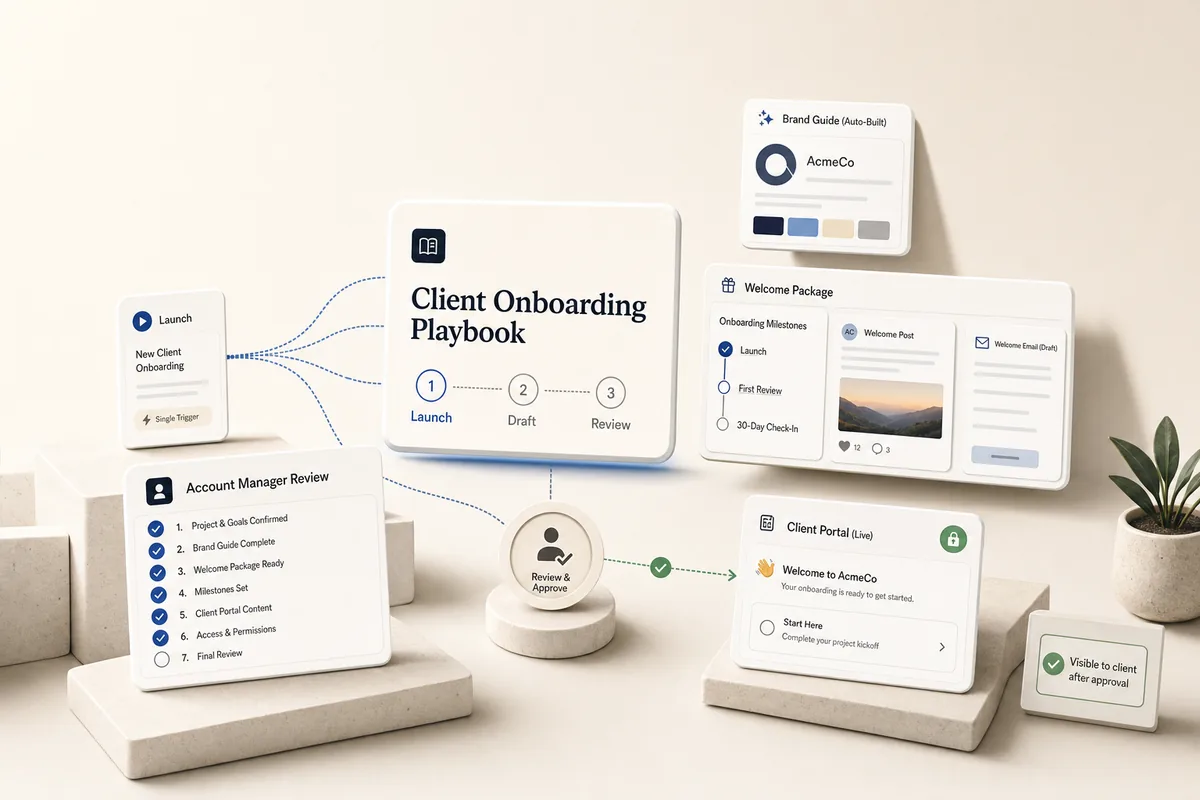
Onboarding a new client usually means a dozen manual setup steps spread across systems: research, brand docs, milestones, a welcome email, a client ask list. This playbook collapses all of that into a single trigger, and sequences the work so the client only sees what the account manager has approved.
When you create the Client Onboarding Launch task, it dispatches the chain. Within 5 minutes, the Brand Guide playbook autofires and produces the Brand Guide note. The next day, the Draft Welcome Package task drafts everything off the now-complete Brand Guide: starting milestones, a warm welcome post on the client’s feed, and a welcome email saved as a deliverable ready to send. The day after that, the Review Client Setup task hits the account manager’s desk with a 7-item checklist: confirm the client overview, confirm the primary contact is added, configure the Client Portal and Services panels, tighten the Brand Guide, adjust milestones, edit and send the welcome email. Only when the account manager completes that review does the AI send the client-facing welcome task to the client’s primary contact, asking them for a few brand specifics (assets, competitors, target market).
The value: AI does the research and drafting, the account manager reviews before anything reaches the client, then the client fills out a short ask. All from one task.
Best for
Any agency that onboards new clients on a regular cadence. The flow works for any business type: the Brand Guide auto-adapts to whatever the client sells (product, service, software, physical location), and the welcome package drafts in that voice.
How the chain works
Template 1: Client Onboarding Launch. The dispatcher. Creates one task from the Brand Guide playbook’s first template (due 5 min from now so it autofires, runs research, and chains to the Draft step that writes the Brand Guide note) and books Template 2 for 1 day out. The Launch does no research or writing itself and does not send anything to the client.
Template 2: Draft Welcome Package. Runs a day after the Launch, which means the Brand Guide has already finished. Reads the Brand Guide note for voice and positioning. Creates three starting milestones (Client Launch, First Deliverable Review, 30-Day Check-In). Posts a warm welcome message to the client’s feed. Saves a welcome email as a deliverable titled “Welcome Email Draft” ready for the account manager to send. Books Template 3 for 1 business day later.
Template 3: Review Client Setup. The account manager’s review. SOPs walk through the client overview and brand config, confirming the primary contact, configuring the Client Portal (which pages the client sees, whether public-link access is on) and the Services panel, tightening the Brand Guide note, adjusting milestones, checking the welcome feed post, and sending the welcome email. When the account manager marks this task complete, a Lifty Prompt fires that finds the client’s primary contact (via list_users scope client) and creates the client-facing Welcome task assigned to that contact. No client-facing task goes out until this review is done.
One supporting template comes with the playbook import:
Welcome - Share Your Onboarding Info is the client-facing task the account manager’s review sends out. Visibility preset to Client Only, so it appears on the client’s portal. It asks the primary contact for three things: brand assets, competitors, and target market. A second Lifty Prompt on this template (invisible to the client) fires when the client marks it complete. That prompt creates a “Review Client Welcome Submission” task for an agency reviewer (assigned to @AccountManager if you’ve customized the prompt, or to any active agency user otherwise) and adds a comment on the new review task pointing the reviewer back to the client’s responses.
Requirements
-
Import the Brand Guide playbook first. The Launch creates a task from it automatically. If it’s not imported, the chain skips that step and leaves a note pointing to the Brand Guide playbook.
-
Fill in the client description and website URL during client creation. The brand extractor runs automatically, so the client profile already has colors, fonts, and logos when onboarding fires.
-
Add at least one client user (the primary contact) either during client creation or by the time the account manager completes the Review Client Setup task. The client-facing welcome task is assigned to that contact. If no client user exists when the review is marked complete, the AI flags it with a comment so the account manager can add the contact and rerun.
-
Replace
@AccountManager in the Launch task’s Lifty Prompt with an @mention of the team member who owns this client.
How to use it
-
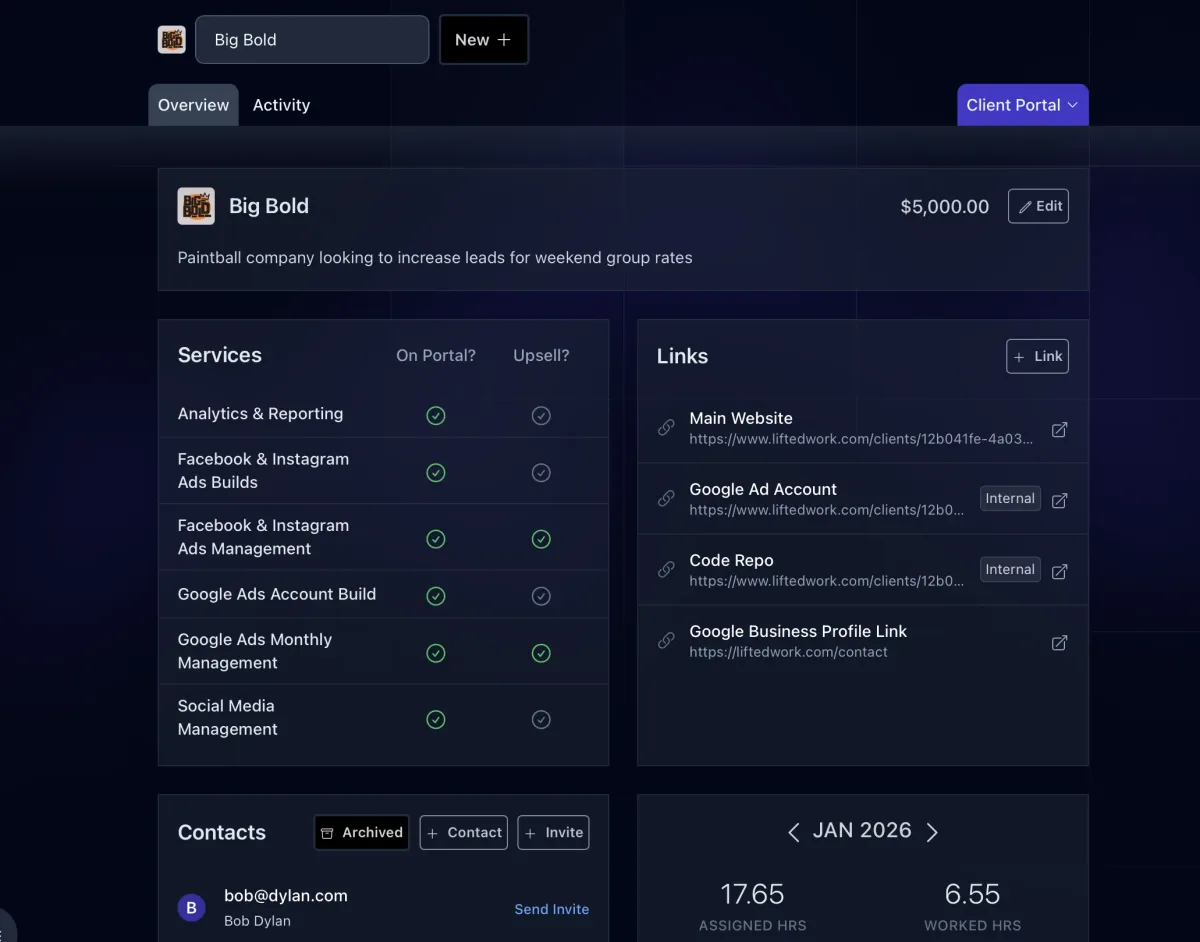
Create the client in Lifted Work. Fill in the description, website URL, and add their primary contact as a client user.
-
Create a task from “Client Onboarding Launch (1/3)” for the new client.
-
The Launch autocompletes and fires off the Brand Guide build. To run the Launch immediately, click Run Prompt or mark it complete.
-
The next day, the Draft Welcome Package task autocompletes and drafts off the now-complete Brand Guide: starting milestones, welcome feed post, welcome email deliverable.
-
The day after that, the Review Client Setup task lands on the account manager’s desk. Walk the checklist: finalize the client profile, confirm the primary contact is added, configure the Client Portal and Services panels (what the client will see when they log in), tighten the Brand Guide, adjust milestones, edit and send the welcome email, check the feed post. When you mark this task complete, the AI sends the client-facing welcome task to the primary contact automatically.
-
The primary contact completes the welcome task on their portal with the requested brand assets, competitors, and target market notes. When they mark it complete, a follow-up review task fires for an agency reviewer to process their submission.
Customize for your services
-
SEO agencies. Pair onboarding with the SEO Keyword Strategy playbook. Run it the day after onboarding to feed the content pipeline.
-
Email marketing. Add the Email Campaign Sequence playbook once the welcome email has sent.
-
Add an SEO baseline. If the client has Search Console connected, add a line to the Draft Welcome Package Lifty Prompt: “Call gsc_search_analytics for a 90-day summary and reference the baseline in the welcome email.”
-
If you don’t use the Brand Guide. Edit the Lifty Prompt in “Client Onboarding Launch (1/3)” and remove the Brand Guide task creation block. The rest of the flow runs unchanged, but the Draft Welcome Package falls back to generic tone, and downstream image and copy playbooks lose brand consistency. Running the Brand Guide playbook is strongly recommended.
Tips
-
Customize the client-facing Welcome task after import. The “Welcome - Share Your Onboarding Info” template ships with a tight 3-item ask (brand assets, competitors, target market). After you import the playbook, edit that template’s SOPs in Settings > Templates to ask for exactly what your agency needs from every new client (account credentials, access tokens, specific inputs for your service). Keep the list short. This is the client’s first impression.
-
Point the review task at the right reviewer. The Welcome task’s Lifty Prompt uses
@AccountManager as a placeholder. After import, edit that prompt (Settings > Templates → “Welcome - Share Your Onboarding Info” → Lifty Prompt tab) and replace @AccountManager with the @mention of the team member who should review new-client submissions. If you leave the placeholder, the AI falls back to list_users and picks any active agency user, which is a safe default but not as deliberate as pointing at a specific person.
-
One trigger, whole onboarding week. The agency does one thing: create the Launch task. Brand Guide builds in minutes, welcome package drafts the next day, review hits the account manager’s desk the day after, and only after the review is done does the client see their welcome task. Scales cleanly as you onboard more clients.
-
The Launch is a pure dispatcher. It only creates tasks. Each dispatched task owns its own scope. That makes the chain easy to customize: add, reorder, or remove dispatched tasks without touching the downstream templates.
-
The Brand Guide is the heart of everything. It’s built here automatically. When the Review Client Setup task hits your queue, spend 5-10 minutes tightening the Prompt Modifier paragraph in the Brand Guide note. It caps the quality of every image and piece of copy the AI generates for this client from that day forward.
-
Welcome email stays in draft. The AI saves the email as a deliverable, not as an outbound message. The account manager edits and sends through their regular email tool, so the client sees a human sender.
-
Pairs with: